> For the complete documentation index, see [llms.txt](https://docs.clipper.exchange/llms.txt). Markdown versions of documentation pages are available by appending `.md` to page URLs; this page is available as [Markdown](https://docs.clipper.exchange/disclaimers-and-technical/integrating-with-clipper-rfq/introduction.md).
# Introduction
## How does it work?
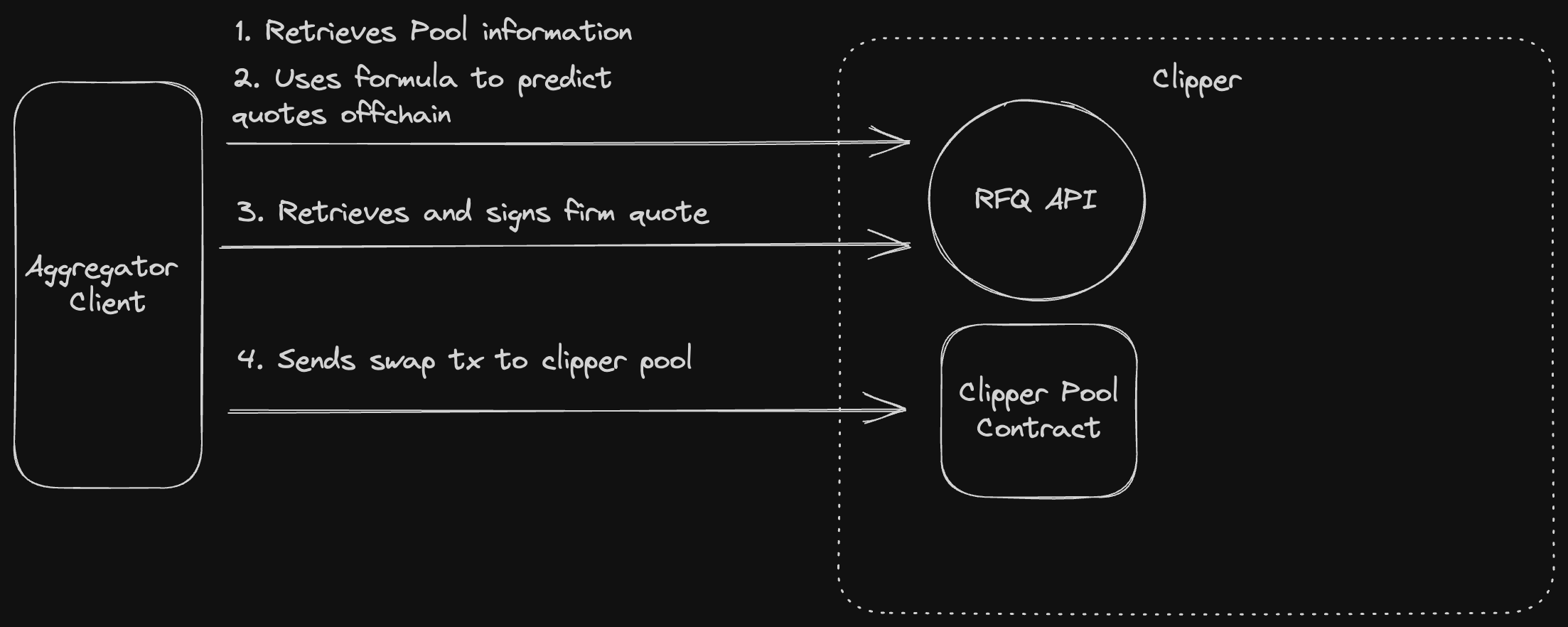
Clipper has a hybrid onchain/offchain infrastructure. We expose an API to you with price feeds and a k-parameter, and give you the formula that we use to quote prices based on those + onchain data. That way you can route based on predictions of what Clipper will quote. Once you’re ready to use Clipper in a route you request a quote from our servers. Output scales with input so you can compose in multihop trades.
{% hint style="success" %}
**Clipper prioritizes protecting LP yield and restricts toxic bot flow.** Clipper values real users. To prevent toxic flow Clipper verifies wallets. Specifically it makes a verification on the wallets used for swaps and checks whether they are EOA (not contracts), have a min amount of ETH, and have done previous txs.
{% endhint %}
## RFQ Swap API
1. Client retrieves pool information
2. Client inputs pool information (price feeds, k factor, etc) in the formula to predict quotes.
3. Client retrieves a firm quote from API
4. Client creates a swap transaction in the clipper pool contract using values from previous step.
For more details about integration check [How to use clipper RFQ API?](/disclaimers-and-technical/integrating-with-clipper-rfq/guides/how-to-use-clipper-rfq-api.md)
## Supported Networks
Network
Chain ID
Ethereum Mainnet
1
Polygon Mainnet
137
Optimism Mainnet
10
Mantle Mainnet
5000
Arbitrum One
42161
{% hint style="info" %}
If you want to review our contracts for each supported network, please refer to this [link](/disclaimers-and-technical/smart-contracts.md)
{% endhint %}
## Get Started
[How to use Clipper API?](/disclaimers-and-technical/integrating-with-clipper-rfq/guides/how-to-use-clipper-rfq-api.md)
[Code Examples](/disclaimers-and-technical/integrating-with-clipper-rfq/guides/integration-examples.md)
[Estimate Clipper Prices](/disclaimers-and-technical/integrating-with-clipper-rfq/guides/estimate-clipper-prices.md)
[Interacting with Clipper Exchange](/disclaimers-and-technical/integrating-with-clipper-rfq/guides/interacting-with-the-clipper-exchange-contracts.md)
[API Reference](/disclaimers-and-technical/integrating-with-clipper-rfq/api-reference/api-v1/overview.md)
[Troubleshooting](/disclaimers-and-technical/integrating-with-clipper-rfq/troubleshooting-and-faqs.md)
To see who else has integrated with Clipper, checkout the data page: